To enable voice input for textfields in HTML5 / Google Chrome, add this to your input field's code:
x-webkit-speech
----
IMPORTANT UPDATE (Nov. 2014): This function has been deprecated -- meaning, it doesn't work anymore. Google shut it down in February of 2014. I read there may have been a lagging shut-off security problem. It was kind of weird coding and a Chrome-only thing anyway.
BUT WAIT -- There is a replacement: A Javascript solution called the Web Speech API.
I'm researching it now. It appear to work just as well. Actually, it is even better -- way better!!! But it's not so simple to implement. I have it working and will make a new post soon.
Again, though, it's only for the Chrome Desktop browser (as of November 2014). Safari claims it will have support for STT soon, too. Here's a couple of demos: for input and here for both input and output....
New Speech Synthesis Tutorial: Check out my Text-to-Speech tutorial which also uses Web Speech API -- AND it works in Chrome for desktop, Chrome mobile, Safari desktop and Safari mobile. Love it!
This is new technology, folks, for web programmers. It's very exciting stuff!!! Check back.
----
Here's an example:
<form>
<input type="text" name="myTextInput" x-webkit-speech />
</form>
Yes, it's
bad HTML coding. To be XHTML and HTML5 compliant:
<form>
<input type="text" name="myTextInput" x-webkit-speech="x-webkit-speech" />
</form>
Ex.
Does it work with the iPhone or iPad version of Chrome?
If you're asking, then you probably already know the answer -- nope. "But," you might say, "iOS Chrome does recognize voice input in the URL field of the browser. So, if it can do that, then it should be able to use the textfield, too, right?" That would make a lot of sense, but sorry -- its not the case as of this posting.
That's rather disappointing for development of web apps, but Google will probably get around to it some day soon. Till then, no, there's nothing you can do to make it work right now.
Voice input is the s***!
Google's input microphone icon has a setting that will allow or disallow users to input cuss words and other insulting terms. A number of words, when spoken into the microphone, will turn into the first letter and a bunch of asterisks. That could be a problem if ... well, if you enjoy saying "bad words."
(I once wrote an in-depth article about this topic, listing all the possible A, B, C, F, M, N, S, & W-words that get weeded out by Google voice, but I'm not going to post them live again here, because -- um, I'd like to get another programming job someday.)
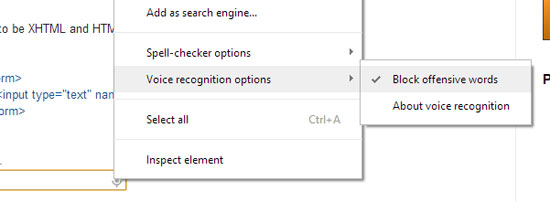
ACTION: If you
right-click on the microphone, you will see a menu like this to "Block offensive words." Click to toggle this feature on or off.